Kailangan mong i-register ang iyong Smart SIM — otherwise, madi-deactivate yan automatically at mawawala ang iyong access sa calls, texts, at data. As required by Republic Act 11934 (SIM Registration Act), lahat ng Smart subscribers sa Pilipinas ay kailangang mag-register. Madali lang — 5 minutes lang yan. You can register online through the official Smart portal (simreg.smart.com.ph), via the GigaLife app, o pumunta sa pinakamalapit na Smart Store. Hindi ka pa naka-register? Basahin ang guide na ito — exact steps, accepted IDs, at kung paano i-check ang iyong registration status. Lahat nandito.
If you are using a Smart prepaid or postpaid SIM, registration is not optional. Unregistered SIM cards are automatically deactivated, meaning you will lose access to calls, texts, and mobile data. This guide explains everything you need to know about Smart SIM registration in 2026, including requirements, registration methods, status checking, special cases, and common problems.
Why Smart SIM Registration Is Required
The Philippine government introduced SIM registration to ensure that every mobile number is linked to a verified individual. This helps authorities track illegal activities, protect users from cybercrime, and maintain accurate subscriber records.
Key benefits of SIM registration include:
Reduced scam and fraud incidents
Protection from spam and phishing messages
Improved mobile security
Compliance with Philippine telecom regulations
Requirements for Smart SIM Registration
Before starting the registration process, prepare the following details and documents.
Basic Information Needed
Before starting, gather the following:
Active Smart SIM number
Full legal name
Date of birth
Nationality
Complete address
Clear selfie photo
Valid government-issued ID
Accepted Government IDs
Smart accepts most official Philippine and international IDs, including:
Passport
PhilSys ID
Driver’s License
SSS ID
GSIS e-Card
UMID
Voter’s ID
NBI Clearance
Police Clearance
PRC ID
Senior Citizen Card
PWD ID
OWWA ID
BIR ID
Any other valid government-issued ID with a photo
Make sure your ID is not expired, clearly visible, and matches the details you enter.
Smart SIM Registration Methods
You can register your Smart SIM online by 5 methods that are given below:
Registration Via Portal (Smart SIM Registration Link)
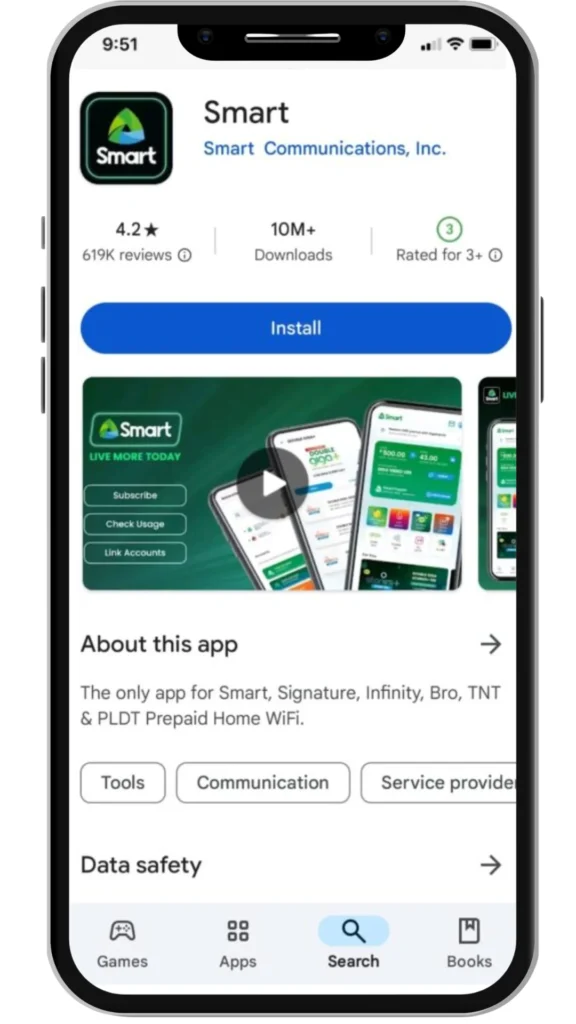
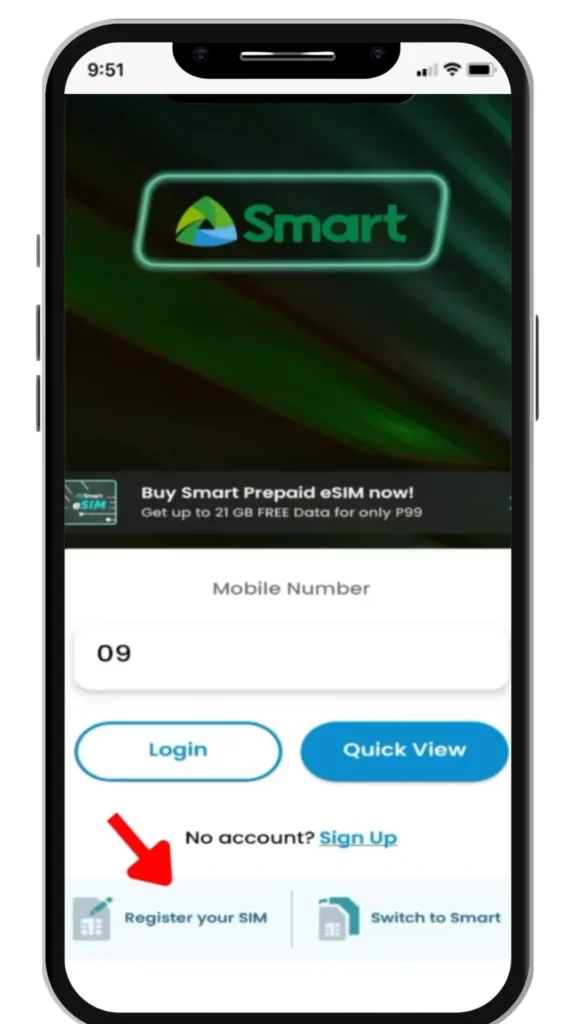
Registration via the GigaLife app
Register by visiting Smart stores
Register via Number
Register Via QR Code
The online process is the fastest and easiest for both new and existing prepaid or postpaid users
1. Register Smart SIM Online via Official Portal
This is the fastest and most commonly used method. Follow these steps carefully to complete your registration:
STEP 1 : First of all, visit the official Smart SIM portal by clicking the registration link below.
Countdown Redirect
10
🎉 Redirecting Now!
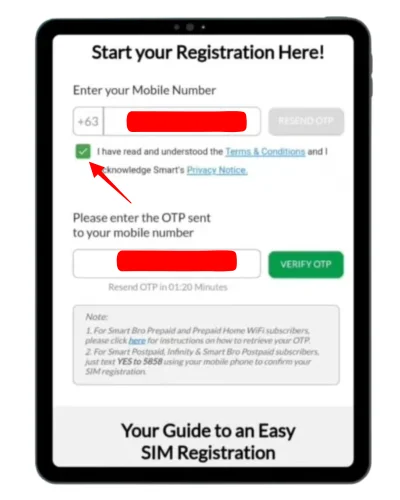
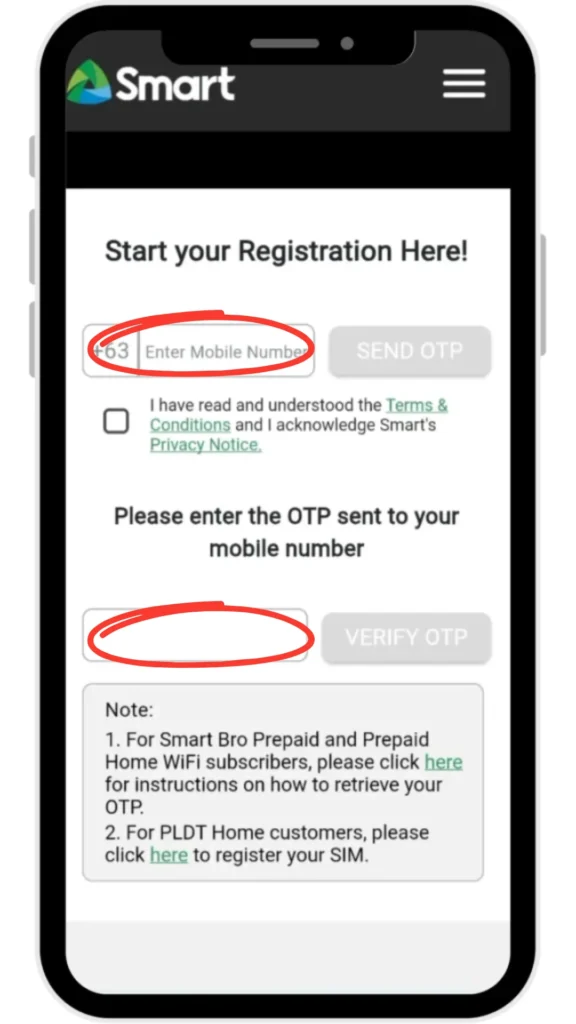
STEP 2 : Enter your 11-digit Smart number and agree to the terms and request an OTP.
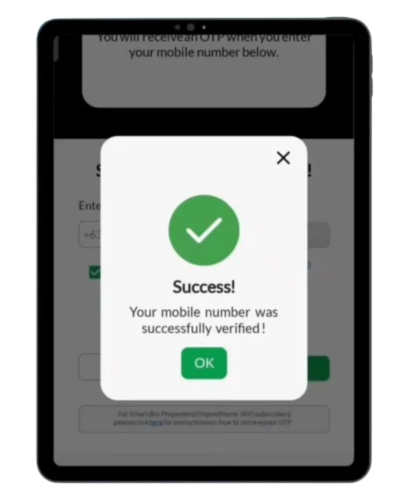
STEP 3 : Enter the OTP sent to your phone and wait for mobile number to be verified.
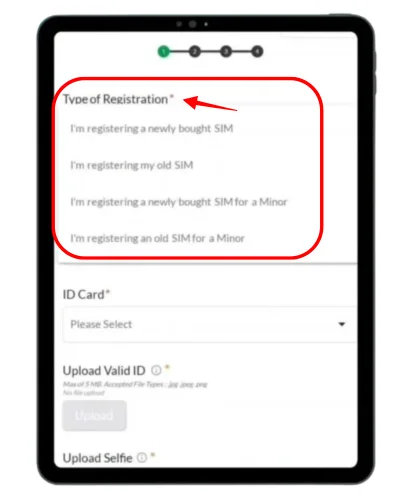
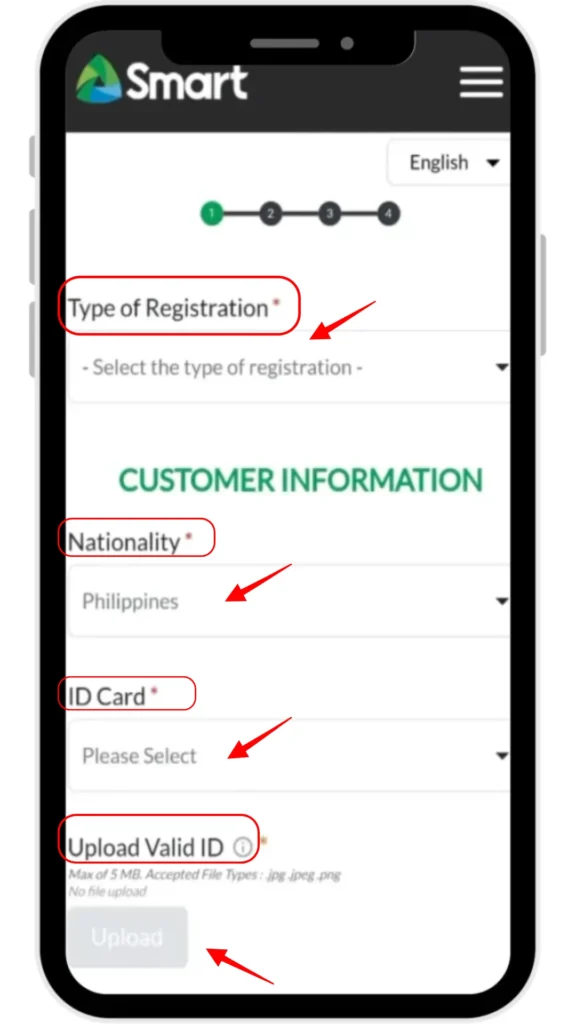
STEP 4: Select "Type of Registration" for a new SIM or existing SIM.
STEP 5: Select the Philippines as your nationality.
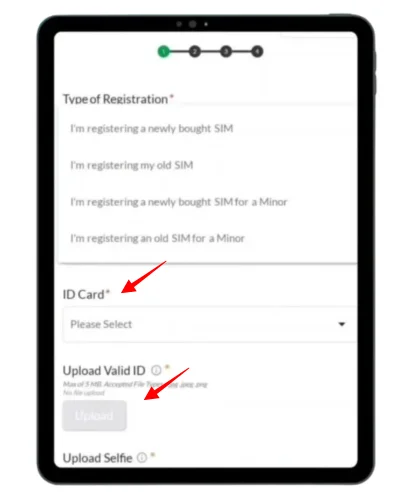
STEP 6: Select a Valid government-issued IDCard, such as a passport, SSS card, or voter’s card from dropdown menu.
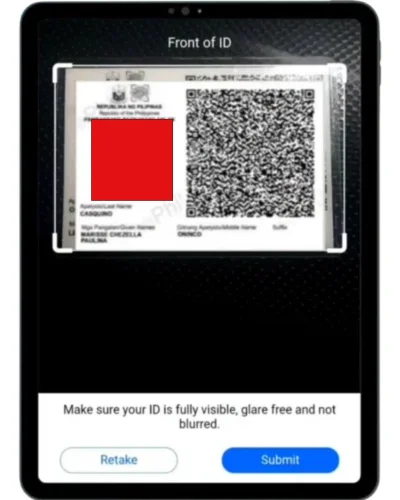
STEP 7: After that, UploadValid ID that you selected above.
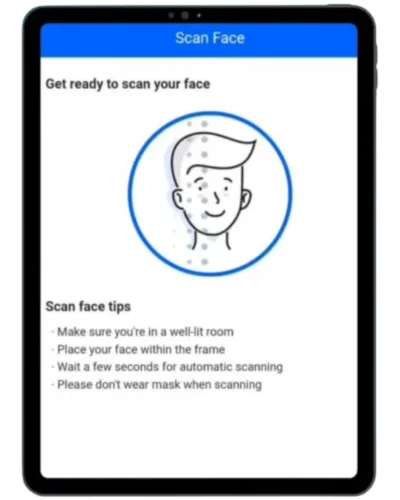
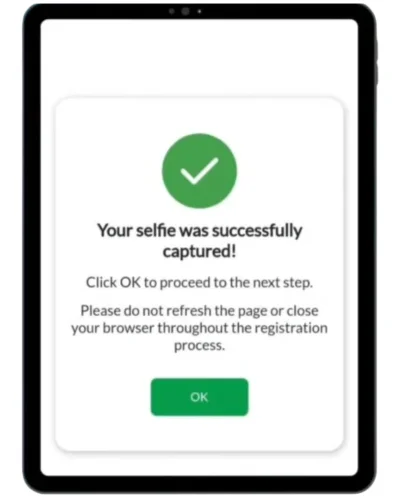
STEP 8: Then you will be asked to upload your selfie.
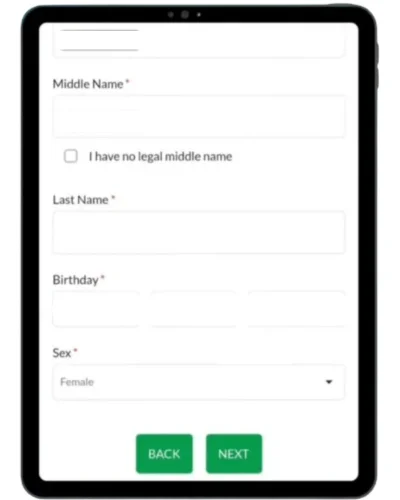
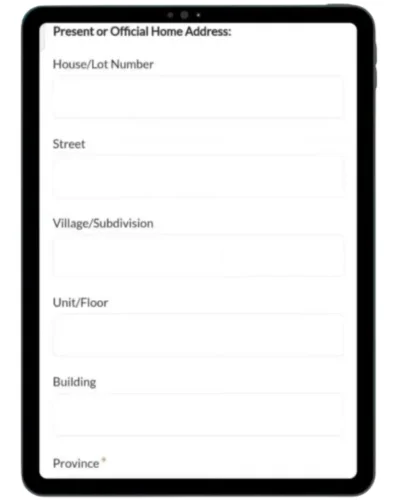
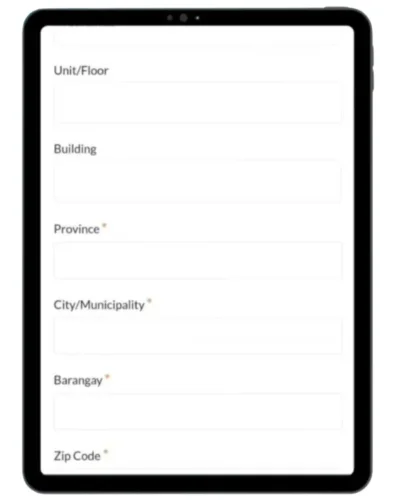
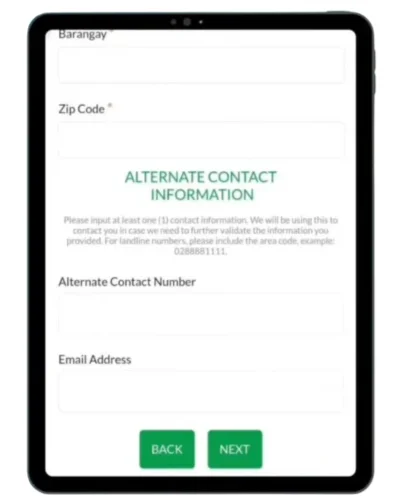
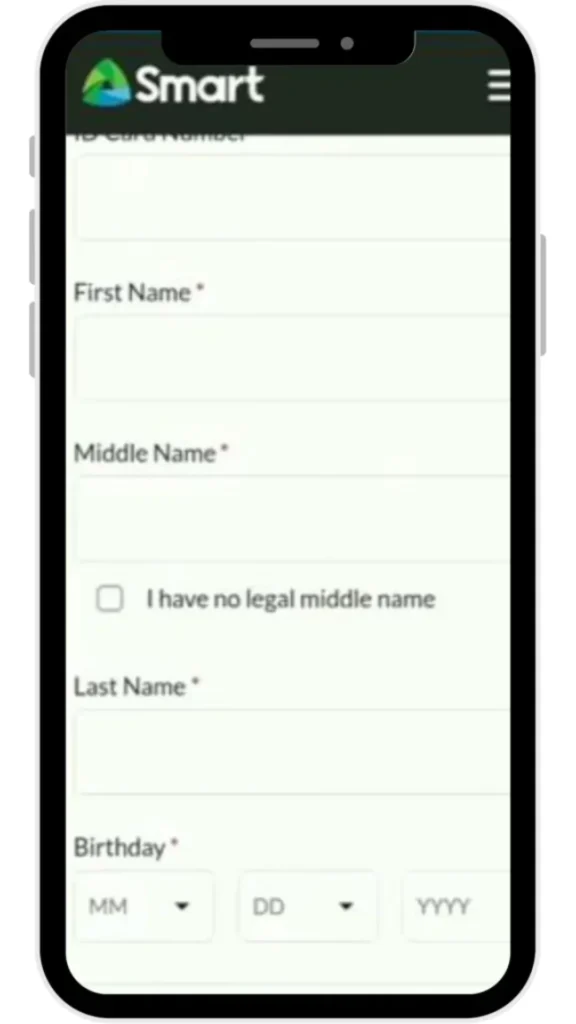
STEP 9: In Customer Information Section Enter your personal details (name, birthdate, gender), current/home address, and valid contact information (email and alternate phone) for verification.
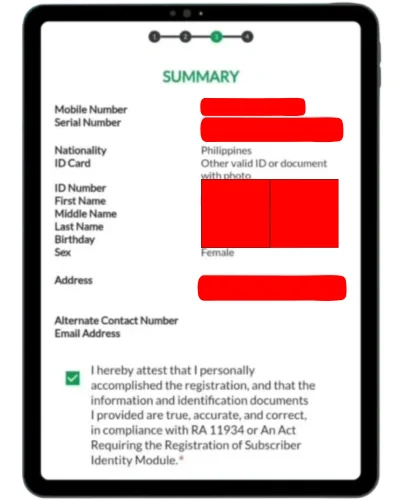
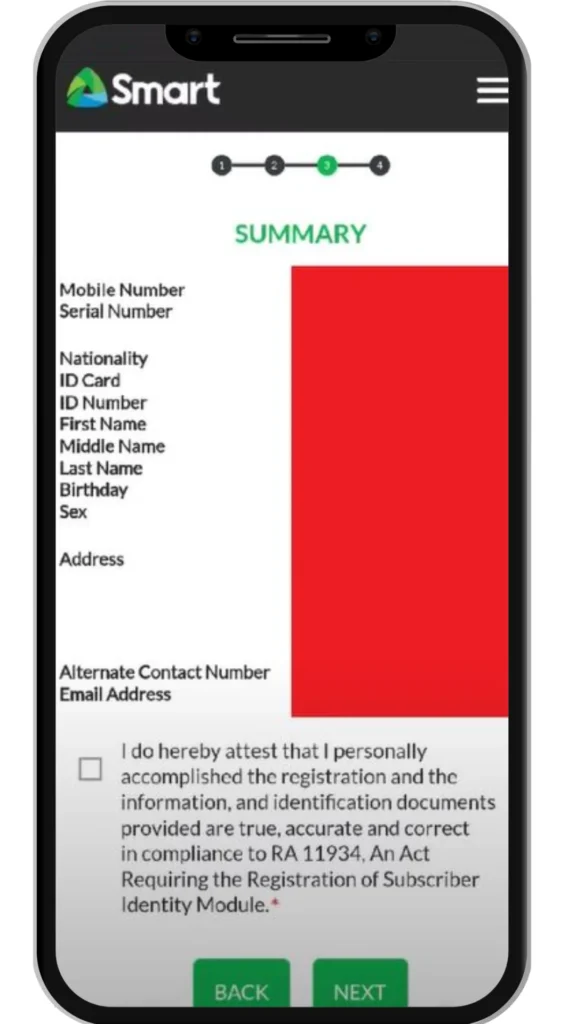
STEP 10: Carefully review the registration details before submitting and confirming them.
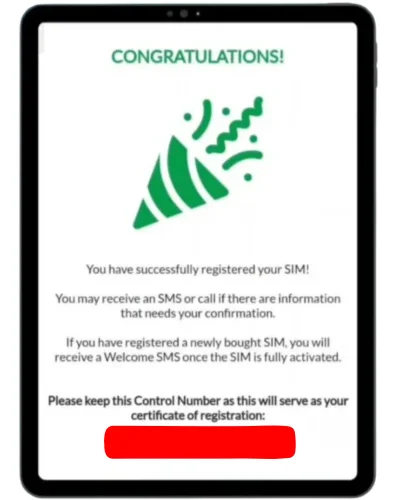
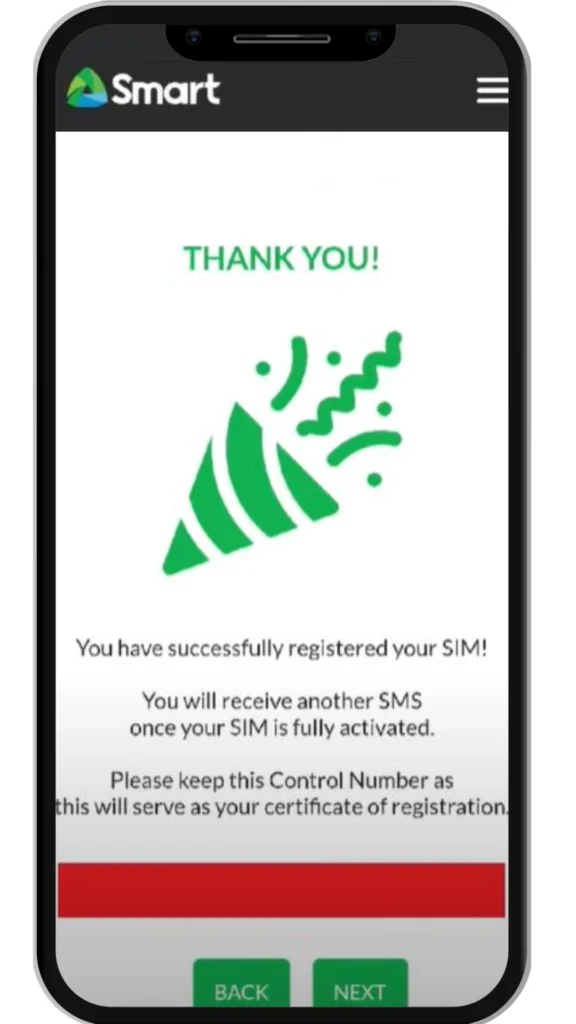
STEP 11: After submitting your application, a unique Control Number will appear on the screen. Save it or take a screenshot, as it serves as proof of registration.
STEP 3: Enter your Smart number and verify via OTP
STEP 4: Upload a clear photo of your valid government-issued ID, complete the required details, and then take a selfie as instructed.
STEP 5: Complete the form with all required information, ensuring every detail matches your official documents.
STEP 6: Review your details in the summary, make sure everything is correct, then submit the SIM registration form and save the confirmation message and control number for future reference.
3. Register at Smart Stores or Authorized Retailers
If you do not have stable internet or prefer in-person assistance, you can visit a Smart Store.
What to do:
Bring your Smart SIM and valid ID
Request SIM registration assistance
A staff member will help process your registration
Wait for confirmation message
This option is recommended for seniors, minors, and PWD
4. Smart SIM Registration via Call (Postpaid Users Only)
This method is available only for Smart postpaid subscribers who need to register a new SIM or renew their existing SIM registration.
New Postpaid SIM Registration
If you’ve purchased a new Smart Postpaid SIM, there’s no need for manual online registration. Your SIM is automatically registered once you accept the Terms & Conditions during activation, making it active and ready for use immediately after setup.
Existing Postpaid SIM Renewal Registration
For postpaid SIM renewals, follow these steps:
Text “YES” to 5858
Wait for a confirmation call
Follow voice instructions
Accept the terms to complete registration.
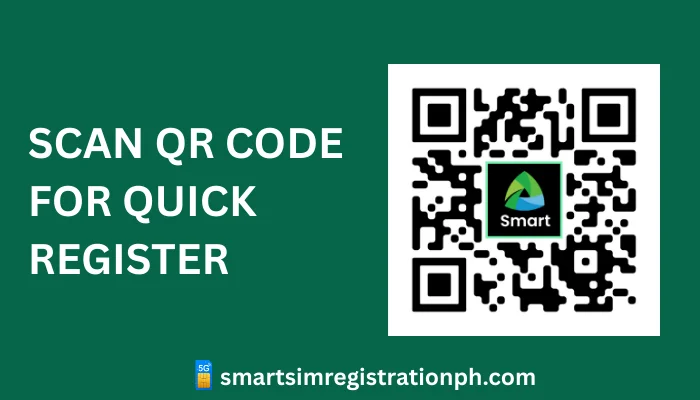
5. Register Via QR Code
Smart provides a QR code that directs you straight to the SIM registration portal. To register, simply follow these steps:
Scan the QR code using your mobile device
Open the registration portal link
Complete the process by following the same steps as online registration
This makes SIM registration quick and convenient.
How to Check Smart SIM Registration Status
After registration, you should always confirm your SIM status.
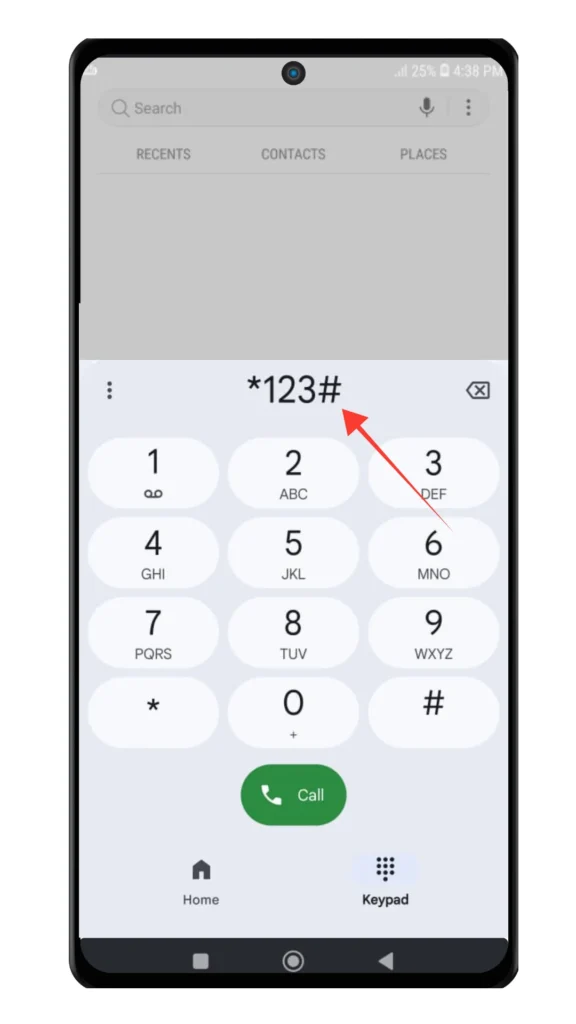
Check via USSD Code
Dial *123#
Select Option 9: "SIM Registration Status" from the menu.
Wait for a confirmation message on your screen. It will show whether your SIM is Registered or Not Registered.
Check via Smart Portal
Visit the official Smart SIM portal
Enter your mobile number
Verify using OTP
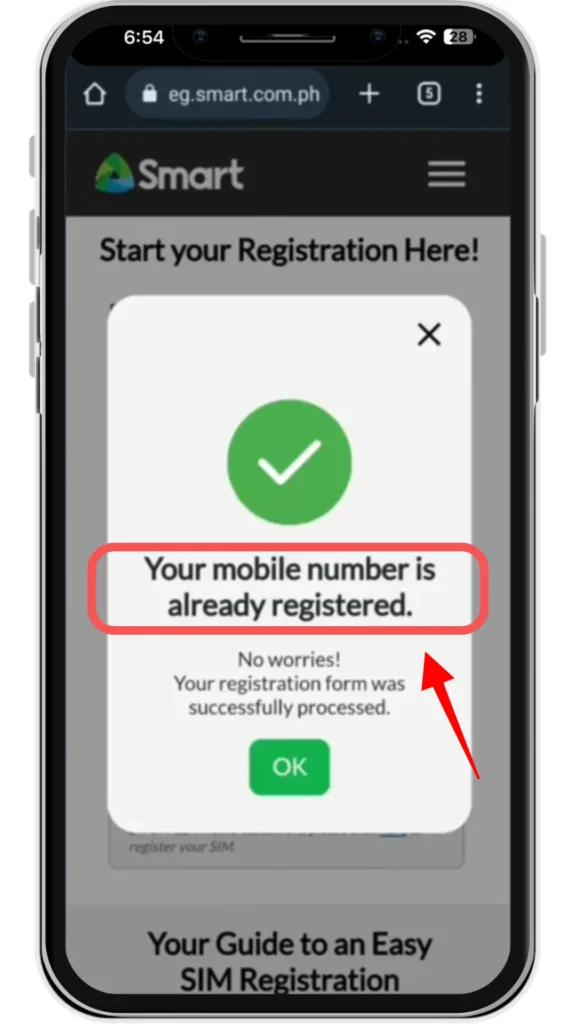
View your registration status on the portal as it will display your SIM Registration Status whether its "Registered or Not Registered".
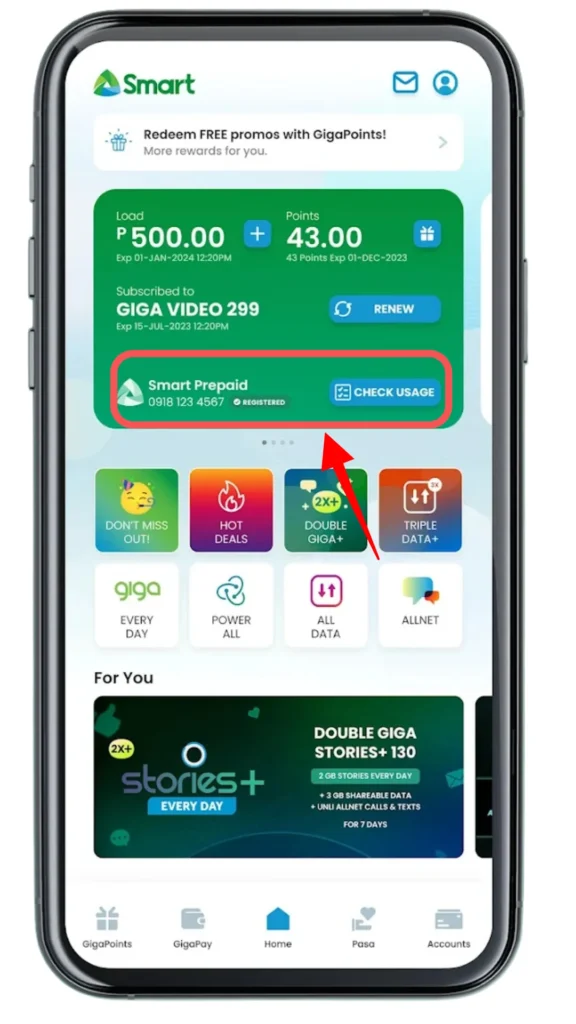
Check via GigaLife App
Log in using your Smart number
Go to account or SIM registration section
Your status will be displayed instantly
Smart SIM Registration for Special Cases
Minors
SIM must be registered under a parent or legal guardian
Guardian must provide valid ID and proof of relationship
Persons with Disabilities (PWDs)
Registration can be done by an authorized representative
Required documents include PWD ID, representative’s ID, and authorization letter
Foreign Nationals and Tourists
Requirements depend on length of stay.
Short-term visitors:
Passport
Proof of local address
Return ticket
Long-term visitors:
Passport with valid visa
ACR or ACR I-Card
Proof of Philippine address
SIM validity is tied to visa duration.
How to Claim Freebies After Smart SIM Registration?
All Smart SIM subscribers will receive 3 GB of free roaming data immediately after successful SIM registration. This freebie comes at no additional or hidden cost.
Additional freebies are provided based on your subscription package, as detailed below:
Subscription Package
Freebies
Prepaid
Receive free calls, text messages, or internet data as part of your subscription.
Postpaid
Enjoy free data, calls, or internet data credited on a monthly basis.
Family Plans
Share free text messages, calls, or internet data with your family members.
Prepaid Home Wi-Fi
Get unlimited internet data at a discounted rate.
Additional ways to claim:
Log in to the GigaLife App.
Once inside the app, go to the FREEBIES or REWARDS section, where available offers are displayed.
Tap Claim to activate your free data or reward. The freebie will be credited to your account within a few minutes.
If freebies do not appear within 24 hours, contact Smart customer service
Smart SIM Registration Video Tutorial
Common Smart SIM Registration Problems and Solutions
OTP Not Received
Ensure stable network
Wait and request OTP again
Check SIM placement
ID Upload Error
Use a valid and clear ID
Avoid blurry or cropped images
Camera Not Working
Allow camera permissions
Ensure device camera is functional
SIM Already Registered
Contact Smart support to update ownership
App Crashing
Update the app
Try again during off-peak hours
Smart SIM Customer Support
SMART HOTLINE
Dial *888 from your Smart or TNT mobile number Call (02) 8888-1111 from a landline
Smart SIM registration is a legal requirement in the Philippines for all users, including minors (with consent), foreigners, companies, and PWDs. With a valid ID and basic details, you can easily register through the online portal, Smart App, Smart Store, or by phone.
Registration keeps your number active and secure, protects you from fraud, and gives you access to customer support, promos, and better network performance. After registering, activate your SIM to start using calls, texts, and data.
Frequently Asked Questions
You can check your SIM registration status through the Smart SIM app by logging into your account. The status will appear on the home screen next to your phone number. You may also check via the Smart SIM website by entering your mobile number and confirming the OTP sent to you.
To resolve this issue, restart your phone and reinsert the SIM card properly. Make sure you have strong network coverage, updated phone software, and correct network settings. If registering online, ensure you upload a valid ID with clear details and have a stable internet connection. If the problem continues, contact Smart customer support.
Yes, you may register multiple Smart SIM cards under your name. A single individual can register up to five (5) voice/data SIMs and three (3) data-only SIMs.
Yes, minors under 18 are allowed to purchase and use a Smart SIM. However, the SIM must be registered under the details of a parent or legal guardian.
The Smart SIM registration number is 5858. Call this number and follow the voice instructions to complete your SIM registration.
Yes, foreigners can purchase SIM cards in the Philippines. Prepaid SIM cards with load are usually available at kiosks and vendors located in the arrival area of major Philippine airports, making it easy to stay connected as soon as you arrive
If your Smart SIM card is not registering, it may be due to poor lighting or camera quality during online registration, an invalid or incorrect ID, a dirty or damaged SIM card, a software issue, or weak network connectivity. In most cases, the problem can be resolved by restarting your phone, reinserting or cleaning the SIM, ensuring proper lighting and a clear ID during registration, or contacting Smart customer support for assistance.
Innovation und Spannung bei Sportwetten
Die digitale Landschaft der Sportwetten hat sich in den letzten Jahren rasant gewandelt und bietet heute eine enorme Vielfalt an Möglichkeiten. Viele Nutzer suchen gezielt nach neo bet um ihre Leidenschaft für den Sport mit strategischen Tipps zu verbinden. Diese Plattformen setzen auf intuitive Bedienung und eine breite Palette an Wettmärkten, die sowohl Anfänger als auch Profis ansprechen.
Ein wesentlicher Vorteil moderner Anbieter liegt in der Geschwindigkeit der Transaktionen und der Übersichtlichkeit der Benutzeroberfläche. Wer sich für eine Registrierung entscheidet, profitiert oft von schnellen Auszahlungen und einem Kundenservice, der bei Fragen jederzeit zur Verfügung steht. Die Sicherheit der persönlichen Daten spielt dabei eine zentrale Rolle, weshalb seriöse Anbieter auf modernste Verschlüsselungstechnologien setzen.
Vielfältige Wettoptionen für jeden Geschmack
Neben den klassischen Siegwetten gibt es eine Vielzahl an Spezialwetten, die das Erlebnis deutlich intensivieren können. Ob Live-Wetten während eines laufenden Spiels oder langfristige Prognosen auf den Ausgang einer ganzen Saison, die Auswahl ist nahezu unbegrenzt. Besonders beliebt sind dabei die folgenden Kategorien:
Fußballwetten auf nationale und internationale Ligen
Tennis-Turniere mit Echtzeit-Quoten
Basketball und Eishockey für Fans schneller Spielzüge
Abschließend lässt sich sagen, dass der Erfolg bei Sportwetten nicht nur vom Glück abhängt, sondern auch von einer fundierten Analyse der Statistiken. Wer die aktuellen Formkurven der Mannschaften kennt und die Quoten richtig zu deuten weiß, kann seine Gewinnchancen langfristig optimieren. Ein verantwortungsbewusster Umgang mit dem eigenen Budget bleibt dabei jedoch stets die wichtigste Voraussetzung für ein nachhaltiges Vergnügen.
Examples are most effective when they do more than illustrate a definition; they should expose the reasoning, limits, and decisions behind a conclusion. In education, a carefully chosen case can turn an abstract principle into a sequence of observable steps, while a weak case may encourage imitation without understanding. A worked test example in mathematics, for instance, should show why each operation is valid, identify the assumptions involved, and explain how a small change in the data affects the result. Comparing two contrasting cases then reveals which features are essential and which are accidental, a distinction that strengthens analytical judgment. Editors and teachers should therefore select examples for clarity, relevance, and transferability rather than novelty alone, updating them when real-world conditions or accepted evidence change.
Ein umfassender Blick auf das Wettangebot von 1xbet
Der Buchmacher 1xbet hat sich in den letzten Jahren als eine der führenden Plattformen für Sportwetten weltweit etabliert. Viele Nutzer suchen nach einer mobilen Lösung, um ihre Wetten bequem von unterwegs zu platzieren, und finden dabei die 1xbet apk für ihre Geräte. Diese Anwendung bietet einen schnellen Zugriff auf alle wichtigen Funktionen und sorgt für ein reibungsloses Wetterlebnis auf dem Smartphone.
Das Angebot umfasst eine beeindruckende Vielfalt an Sportarten, von Fußball und Tennis bis hin zu Nischensportarten und E-Sports. Kunden schätzen besonders die hohen Quoten und die intuitive Benutzeroberfläche, die es auch Anfängern leicht macht, sich zurechtzufinden. Zudem gibt es zahlreiche Live-Wettoptionen, die das Mitfiebern bei laufenden Spielen noch spannender gestalten.
Sicherheit und Kundenservice
Neben der großen Auswahl an Wettmärkten legt der Anbieter großen Wert auf die Sicherheit der Nutzerdaten und faire Spielbedingungen. Ein engagierter Kundensupport steht rund um die Uhr zur Verfügung, um bei Fragen oder technischen Problemen schnell und kompetent weiterzuhelfen. Dies schafft Vertrauen bei der wachsenden Community, die täglich auf die Plattform zugreift.
Zusammenfassend lässt sich sagen, dass 1xbet eine solide Wahl für alle ist, die eine abwechslungsreiche und moderne Wettumgebung suchen. Durch die ständige Weiterentwicklung der technischen Infrastruktur bleibt der Anbieter stets am Puls der Zeit. Wer sich für Sportwetten interessiert, findet hier eine Plattform, die sowohl durch Quantität als auch durch Qualität überzeugt.
Navigating the Ontario Lottery and Gaming Corporation
The Ontario Lottery and Gaming Corporation serves as the primary regulatory body for gambling activities across the province. To access your account and manage your gaming preferences, you can use the olg login portal securely. This platform provides a centralized hub for players to participate in various lottery draws and digital casino games from the comfort of their homes.
Safety and responsible gaming remain at the forefront of the organization's mission. By providing tools for self-exclusion and deposit limits, the platform ensures that users maintain control over their entertainment habits. These features are integrated directly into the user dashboard, making it easy to monitor activity and set personal boundaries.
Available Gaming Options
Players have access to a wide variety of entertainment choices, ranging from classic lottery tickets to modern slot machines and live dealer experiences. The digital interface is designed to be intuitive, allowing for seamless navigation between different game categories. Whether you are interested in sports betting or instant win games, the selection is updated regularly to keep the experience fresh.
The transition to digital platforms has significantly changed how residents interact with provincial gaming services. By streamlining the verification process and enhancing security protocols, the corporation has built a reliable environment for all participants. As technology continues to evolve, the integration of mobile-friendly features ensures that users can enjoy their favorite games on the go without compromising on quality or security.
Betalingsmetoder for norske spillere
Mange spillere vurderer ulike alternativer for innskudd når de skal spille på nett. Det er viktig å vurdere sikkerheten før man velger sas kredittkort som sin foretrukne betalingsmetode. Ved å være bevisst på egne vaner kan man opprettholde en sunn økonomi samtidig som man nyter underholdningen.
Når du bruker kredittkort til spill, er det ofte en fordel at transaksjonene går umiddelbart gjennom. Dette gjør at du kan starte spillingen med en gang uten forsinkelser. Likevel bør man alltid sjekke hvilke gebyrer som kan påløpe fra bankens side, da dette varierer stort mellom ulike finansinstitusjoner.
Ansvarlig spill og økonomisk kontroll
Det er essensielt å sette opp et strengt budsjett før man begynner å spille. Kredittkort gir deg muligheten til å bruke penger du ikke nødvendigvis har tilgjengelig på kontoen der og da, noe som krever ekstra disiplin. Mange velger derfor å sette egne beløpsgrenser hos casinoet for å unngå at spillingen tar overhånd.
Til slutt bør man alltid sørge for at nettstedet man benytter har gyldige lisenser og gode sikkerhetsprotokoller. Ved å velge anerkjente aktører reduserer du risikoen for problemer knyttet til både personvern og utbetalinger. Husk at spilling alltid skal være en form for underholdning, og aldri en måte å løse økonomiske utfordringer på.
Innovasjon bak kulissene i casinoverdenen
Spillbransjen på nett er i konstant endring takket være teknologisk utvikling og kreativitet. Utvalget av casino spillutviklere er i dag større enn noen gang tidligere. Dette gir spillerne tilgang til et enormt spekter av unike spilleautomater og moderne live-spill.
Hva kjennetegner de ledende aktørene?
De mest suksessrike selskapene skiller seg ut ved å tilby grafikk av høy kvalitet og sømløs integrasjon på mobile enheter. De prioriterer rettferdig spill ved å bruke sertifiserte slumptallsgeneratorer som sikrer at alle utfall er tilfeldige. Spillere bør alltid sjekke hvilke lisenser en utvikler opererer under for å sikre en trygg opplevelse.
Fremtiden for spillutvikling ser lys ut med økt fokus på virtual reality og gamification-elementer som gjør opplevelsen mer interaktiv. Mange utviklere eksperimenterer nå med nye mekanikker som endrer måten vi tenker på tradisjonelle gevinster. Uansett hvilken type spill man foretrekker, er det tydelig at innovasjon driver hele markedet fremover i et høyt tempo.
Hvorfor er uttaksgrense viktig for spillere?
Mange spillere blir overrasket når de ser begrensninger på hvor mye penger de kan ta ut av spillekontoen sin per uke eller måned. Det er viktig å forstå hvordan en uttaksgrense bn bank fungerer før man begynner å satse større summer. Disse reglene er satt for å sikre at casinoet opprettholder god likviditet og kan håndtere transaksjoner på en trygg måte for alle brukere.
Det finnes flere ulike typer begrensninger som kan påvirke hverdagen din som spiller. Noen aktører opererer med daglige maksbeløp, mens andre ser på den totale summen per kalendermåned. VIP-spillere kan ofte forhandle seg frem til høyere tak, noe som er en stor fordel for de som spiller med hyppige gevinster.
Viktige tips for uttaksprosessen
Sjekk alltid vilkårene før du gjør et innskudd.
Bruk samme betalingsmetode for uttak som ved innskudd.
Verifiser kontoen din tidlig for å unngå forsinkelser i utbetalingen.
Strategier for å stoppe uønskede meldinger
Mange mobilbrukere opplever frustrasjon når telefonen blir oversvømt av meldinger fra ukjente aktører. Det er irriterende å oppleve ciobhan sms spam som dukker opp midt i hverdagen. Det finnes heldigvis flere måter å beskytte seg mot denne typen markedsføring på ved å være bevisst på personverninnstillinger.
De fleste operatører tilbyr nå løsninger for filtrering av ukjente avsendere direkte i telefonens programvare. Ved å blokkere numre fortløpende kan du redusere mengden uønsket trafikk betydelig over tid. Husk at du aldri bør klikke på lenker i meldinger som virker mistenkelige, da dette ofte bare bekrefter for avsenderen at ditt nummer er aktivt.
Det er også viktig å vurdere om du har lagt igjen telefonnummeret ditt på nettsider som selger videre informasjon. Ved å reservere deg mot direkte markedsføring i offentlige registre, kan du forhindre at din kontaktinformasjon havner hos useriøse selskaper. Vær alltid kritisk til hvor du oppgir sensitive opplysninger på nett for å unngå fremtidige problemer.
Hvorfor velge Ekte-live spillopplevelser
Mange spillere søker i dag etter en mest mulig autentisk kasinoopplevelse hjemmefra. Det er viktig å være kritisk til innholdet man finner på nett, som for eksempel live kameraer sex gratis ekte sex dukke sex for å forstå teknologien bak. Når du velger en anerkjent plattform, er du sikret ekte profesjonelle dealere og sanntidssendinger.
Ekte-live spill bringer den sosiale atmosfæren rett inn i din stue uten at du trenger å forlate huset. Ved å bruke høyoppløselig video og avansert strømmeteknologi kan du følge hvert kast med terninger eller hvert kort som blir delt ut med egne øyne. Denne åpenheten skaper en helt nødvendig tillit mellom spillere og kasinooperatører i en digital hverdag.
For å få mest ut av spilløkten anbefales det å teste ulike bord med varierte innsatsgrenser. Mange spillere setter pris på muligheten til å kommunisere direkte med dealeren gjennom chatfunksjoner, noe som forsterker følelsen av å være til stede i et fysisk kasino. Husk alltid å spille ansvarlig og sette klare grenser for din egen underholdning slik at opplevelsen forblir positiv over tid.
Smarte valg for innskudd og uttak
Mange spillere leter etter gode løsninger for å håndtere transaksjoner på tvers av ulike spillsider. Det er viktig å forstå hvilke betalingsmetoder på nett som gir den beste opplevelsen i dagens marked. Ved å velge riktig alternativ kan du sikre raske overføringer og unngå unødvendige problemer med kontoen din.
Det finnes i dag flere populære alternativer som kortbetaling, e-lommebøker og forhåndsbetalte kuponger. Mange foretrekker e-lommebøker fordi de fungerer som et mellomledd mellom banken og spillselskapet, noe som ofte gir et ekstra lag med trygghet. Det lønner seg alltid å sjekke vilkårene for hver enkelt metode før du setter inn penger for første gang.
Husk at tilgjengeligheten av disse løsningene kan endre seg over tid avhengig av reguleringer og bankenes egne retningslinjer. Det er derfor lurt å ha en alternativ plan klar dersom din foretrukne løsning skulle slutte å virke. Med litt forberedelse kan du nyte spillopplevelsen uten bekymringer knyttet til transaksjonene dine.
Hvordan fungerer chargeback i casinoverdenen
Mange spillere lurer på om det er mulig å få dekket tap gjennom banken. Noen undersøker om de kan bruke en chargeback app for å fremme slike krav mot spilloperatører. Det er viktig å forstå at slike transaksjoner ofte regnes som frivillige, noe som gjør tilbakeføring juridisk krevende i de fleste tilfeller.
Begrepet chargeback refererer opprinnelig til en beskyttelse for forbrukere ved uautoriserte kortkjøp eller svindel. Når det kommer til pengespill, vurderer banker sjelden tapte innsatser som en gyldig grunn for å reversere en betaling. Dersom du mener at du har blitt utsatt for direkte svindel eller tekniske feil hos et casino, bør du heller kontakte bankens kundeservice direkte fremfor å stole på tvilsomme tredjepartsverktøy.
For å forebygge økonomiske utfordringer er det alltid anbefalt å sette tydelige tapsgrenser før man begynner å spille. Å spille med penger man ikke har råd til å tape, kan føre til store frustrasjoner som ingen tilbakeføringstjeneste kan løse. Sørg for at du benytter deg av lisensierte aktører som følger strenge regler for ansvarlig spill og sikker transaksjonshåndtering.
Regelgeving voor online casino promoties
De Nederlandse gokmarkt is de laatste jaren flink veranderd door striktere wetgeving rondom reclame en extraatjes. Veel spelers vragen zich af hoe de Kansspelwet bonussen momenteel beïnvloedt voor consumenten. Deze maatregelen zijn ingevoerd om kwetsbare groepen beter te beschermen tegen gokverslaving. Het is belangrijk om te begrijpen dat de juridische kaders voortdurend in beweging blijven.
Door de huidige beperkingen zien we dat aanbieders hun strategieën moeten aanpassen aan de eisen van de toezichthouder. Waar bonussen voorheen royaal en onbeperkt werden weggegeven, gelden er nu specifieke voorwaarden die misleiding moeten voorkomen. Dit betekent dat spelers vaker geconfronteerd worden met duidelijke bonusvoorwaarden die transparantie waarborgen. Deze aanpak draagt bij aan een veiligere speelomgeving voor iedereen die een gokje waagt op legale platforms.
Uiteindelijk verschuift de focus in de industrie naar verantwoord spelen in plaats van enkel het lokken van nieuwe gebruikers met hoge bedragen. Gebruikers doen er verstandig aan om de kleine lettertjes altijd goed te lezen voordat zij deelnemen aan een promotie. Op deze manier blijft de ervaring leuk en beheersbaar, terwijl de wetgeving zijn werk doet om excessen op de markt tegen te gaan. Spelen bij een betrouwbaar casino is daarom belangrijker dan ooit.
De rol van digitale identificatie in de goksector
Online casino's in Nederland moeten strikte regels volgen om de identiteit van hun spelers te verifiëren. Een snelle en veilige optie hiervoor is Documentcontrole iDIN voor een zorgeloze start. Door gebruik te maken van de vertrouwde bankomgeving wordt het registratieproces aanzienlijk versneld en veiliger gemaakt voor alle betrokken partijen.
Het grootste voordeel van deze methode is dat gegevens direct en geverifieerd worden doorgegeven aan de gokexploitant. Hierdoor hoeven spelers niet langer te wachten op het handmatig uploaden en laten keuren van een paspoort of rijbewijs. Dit proces bespaart niet alleen kostbare tijd, maar verkleint ook de kans op fouten bij het invoeren van persoonlijke informatie tijdens de aanmelding.
Toekomst van online authenticatie
Naarmate de digitalisering toeneemt, zullen steeds meer legale aanbieders inzetten op geautomatiseerde oplossingen. Het gebruik van betrouwbare identificatiemiddelen wordt zo de nieuwe standaard voor zowel veiligheid als gebruiksgemak. Spelers kunnen hierdoor direct genieten van hun favoriete spellen zonder dat zij zich zorgen hoeven te maken over de bescherming van hun privacygevoelige documenten.
If you prioritize responsible gambling, crownpokies casino offers a secure and mindful environment to enjoy your favorite slots and games, ensuring a balanced gaming experience.
Merülj el a szerencsejáték izgalmaiban, ahol a Vicibet kínál több száz online kaszinójátékot neves szolgáltatóktól, köztük nyerőgépeket, rulettet és élő osztós asztalokat.